C# – String.Concat vs String.Join
I had a quick Google search for a comparison between string.concat and string.join, but I couldn’t find anything.
Say you want to construct the sentence “The quick brown fox jumps over the lazy dog”
This is comprised of 9 words, 8 spaces.
Using string.concat:
public void CreateSentanceUsingStringConcat()
{
    string space = " ";
    string the = "the";
    string quick = "quick";
    string brown = "brown";
    string fox = "fox";
    string jumps = "jumps";
    string over = "over";
    string lazy = "lazy";
    string dog = "dog";

    var result = string.Concat(the, space, quick, space, brown, space, fox, space, jumps, space, over, space, the, space, lazy, space, dog);
}
Using string.join
public void CreateSentanceUsingStringJoin()
{
    var result = string.Join(space, the, quick, brown, fox, jumps, over, the, lazy, dog);
}
With String.concat, we must explicitly add the separator (in our case, space) between each string.
String.join however, allows us to specify the separator as the first parameter.
Performance
I wrote a small benchmark test on the two (see bottom of this post for code)
We can see string.join consistently performs better
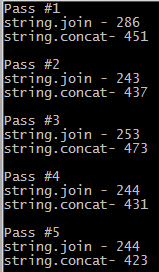
Benchmark Code:
Note – This is available on GitHub – http://github.com/alexjamesbrown/StringConcatVsStringJoin
class Program
{
    //string.concat or string.join a million times to get a better reading
    const int numberOfTimesToRun = 1000000;

    const string space = " ";
    const string the = "the";
    const string quick = "quick";
    const string brown = "brown";
    const string fox = "fox";
    const string jumps = "jumps";
    const string over = "over";
    const string lazy = "lazy";
    const string dog = "dog";

    static void Main()
    {
        for (var i = 1; i <= 5; i++)
        {
            Console.WriteLine("Pass #" + i);
            Go();
            Console.WriteLine();
        }

        Console.Read();
    }

    private static void Go()
    {
        var concatStopWatch = Stopwatch.StartNew();

        for (var i = 0; i < numberOfTimesToRun; i++)
            string.Concat(the, space, quick, space, brown, space, fox, space, jumps, space, over, space, the, space, lazy, space, dog);

        concatStopWatch.Stop();

        var joinStopWatch = Stopwatch.StartNew();
        for (var i = 0; i < numberOfTimesToRun; i++)
            string.Join(space, the, quick, brown, fox, jumps, over, the, lazy, dog);

        joinStopWatch.Stop();

        Console.WriteLine("string.join - {0}", joinStopWatch.ElapsedMilliseconds);
        Console.WriteLine("string.concat- {0}", concatStopWatch.ElapsedMilliseconds);
    }
}
Update – StringBuilder.Append
In the comments, Dejan Stojanović put together a similar test using StringBuilder.Append – with similar, and sometimes slightly better results!

See this commit for the update
You have switched your captions/timers in your Console.WriteLine. s1 is the concat timer, s2 is the join timer. If you use names like joinTimer and concatTimer this would be obvious
Sorry, I totally missed this comment (for 2 years it seems)
Switching to Disqus and Tim’s comment below has alerted me to it!
I’ll fix this!
Andrew’s comment is two years old but the code is still incorrect. So actually string.Join is faster.
You’re right… I’ve replied above, will fix!
Thanks to those who pointed out the issues. I’ve fixed the code and made it available on GitHub!
nice
thank you for the experiment
Quite interesting. I’ve never thought that using of join method would be so efficient, so thanks for sharing your experience. 🙂
I just saw this test and wanted to add one more methods and that is StringBuilder. I was amazed that StringBuilder.Append worked even faster than String.Join.
As far as I could see in most of the articles on internet, StringBuilder is described as the slowest one, but in this test it had the best score.
The following is test code and attached are results screenshot
var stringbuilderStopWatch = Stopwatch.StartNew();
for (var i = 0; i < numberOfTimesToRun; i++)
new StringBuilder().Append(space).Append(the).Append(quick).Append(brown).Append(fox).Append(jumps).Append(over).Append(the).Append(lazy).Append(dog);
stringbuilderStopWatch.Stop();
Could you fork the repository – https://github.com/alexjamesbrown/StringConcatVsStringJoin and add it as a pull request? I would be interested to see this…
Pull request created. Let me know when you take a look at it. I’m really curious to determine which approach for building string is the fastest one 🙂
Sorry for taking so long to get back to you!
Pull request merged, and article updated – very impressive results.
Thanks!
I think this isn’t an accurate test. StringBuilder’s Append method works like string.Concat and not string.Join so you have to append the space between each word. Also, just doing the appends will not return a string, but a StringBuilder object. You have to call ToString after to get the string.
Here is an example:
new StringBuilder().Append(the).Append(space).Append(quick).Append(space).Append(brown).Append(space).Append(fox).Append(space).Append(jumps).Append(space).Append(over).Append(space).Append(the).Append(space).Append(lazy).Append(space).Append(dog).ToString();
When I add these changes, it looks like string.join is faster.
Sorry for replying to an old post
https://uploads.disquscdn.com/images/3790cdaa23b5455c5c2e90cb36ef0b803cf30e88dfe16cb8a9f24a161acfc633.png
FYI – string.Join is backed by StringBuilder.