While developing an Azure Function application, using this tutorial, I encountered a problem.
Ultimately, using `func new` generated my function (the run.csx file) which looked like this:
public static void Run(string mySbMsg, TraceWriter log)
{
    log.Info($"C# ServiceBus topic trigger function processed message: {mySbMsg}");
}
Side note: the `mySbMsg` is important – it’s defined in the function.json bindings, and must match.
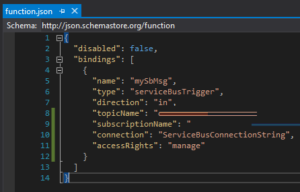
However, there was a problem.
When sending messages to my topic, they weren’t being picked up by my function.
I was using some very simplistic code to send messages to my topic:
var topicName = "dev-customer-events";
var serviceBusConnectionString = "Endpoint=sb://.....";

var topicClient = new TopicClient(serviceBusConnectionString, topicName);

var thing = new
{
    Title = "Hello"
};

var json = JsonConvert.SerializeObject(thing, new JsonSerializerSettings
{
    ContractResolver = new CamelCasePropertyNamesContractResolver()
});

var message = new Message(Encoding.ASCII.GetBytes(json))
{
    //without this, was getting following exception:
    //  Batching brokered messages with distinct SessionId, PartitionKey, or MessageId
    //  is not supported for an entity with partitioning and duplicate detection enabled.

    MessageId = Guid.NewGuid().ToString()
};

await _topicClient.SendAsync(message);
The messages were definitely being delivered to the topic – I could see that in the Azure portal.
However, the function wasn’t picking them up.
The issue was around the `string mySbMsg` parameter.
The scaffolding assumed that it would be a string – but it is in fact, a `byte[]` (due to me serializing the JSON)
Changing this parameter to be a byte[] – and my messages are now received by my locally running function.