Whilst setting up an application to run on my local machine (running Vista 64bit) I encountered this error:
Could not load file or assembly ‘ChilkatDotNet2’ or one of its dependencies. An attempt was made to load a program with an incorrect format.
Obviously, the application uses ChilKat components, but it would seem that the version we are using, is only the 32bit version.
To resolve this error, I set my app pool in IIS to allow 32bit applications.
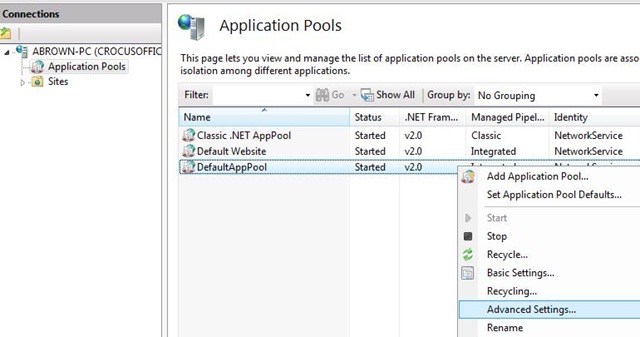
Open up IIS Manager, right click on the app pool, and select Advanced Settings (See below)
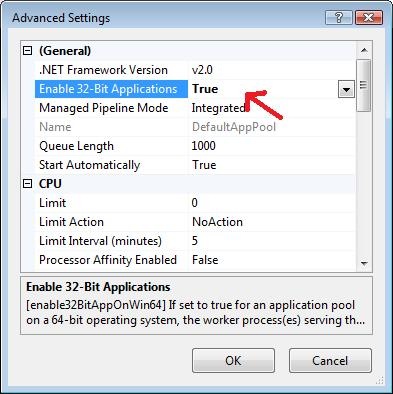
Then set “Enable 32-bit Applications” to True.
All done!
Yes, thank you. You helped me a lot.
Also see http://stackoverflow.com/questions/41449/i-get-a-an-attempt-was-made-to-load-a-program-with-an-incorrect-format-error-on/2926982#2926982
thank you , you saved me
thanks.. you’re legend!
thanks you’re legend!
You safe my life. Thanks a lot.
muchas gracias!!
You are a hero! Thank you for saving us all.
Useless. Switching that on will run the workerprocess(w3wp) also in 32-bit mode.
How to make a 64-bit web app which refers to 32-bit DLLs inside the same app pool?
Many Many Thanks for the article. Its really helpful. Fixed my issue.
Rakesh Thakor.
Great I spent hours looking for possible problems in my code and then some more time searching for explainations on the net. Your solution worked 100% on Windows server 2008 64bit and Visual Studio 2010. Thanx
Useless,I agree with J.This is not working in main [IIS] application is 64 BIt and it is trying to access 32Bit dll.
Really help me lot…..i was wasted last 2 days on it…
Thank you for really important information.
no mames!, eres mi idolo
Did not help me. There was no change. I restarted IIS also. Still get “an attempt was made .. incorrect format”. I changed both DefaultAppPool, and the app-pol for this specific site.
This suggestion didn’t help me, again I take the same error.
Thanks a million, never would have figured it out!
-James
[…] See http://www.alexjamesbrown.com/uncategorized/could-not-load-file-or-assembly-chilkatdotnet2-or-one-of… […]
What about win32 programs using chilkat having the problem?
Thanks a million
if you are using in windows forms application
go to project properties–>>Build tab and change platform target to x86,
problem will be solved
Solved my problem.
Thanks in advance !
[…] guy did a nice picture: change app pool to 32 bit This entry was posted in Other. Bookmark the permalink. ← There is a duplicate […]
Many Thanks!
Thanks! This really helped. The developer didn’t even know that Chilkat was used in one of his teams shared DLLs.
[…] to Alex James Brown for this tip. Share this:TwitterFacebookLike this:LikeBe the first to like this […]
it’s help for me.
Thanks
Thanks nhieu nhe ban. I’m Vietnamese
This was not enough for me to use Oracle.DataAccess . Anyone has any ideas?
read this…
http://rambletech.wordpress.com/2011/09/26/could-not-load-file-or-assembly-oracle-dataaccess-error/
i hope help u!
Great post! It help me a lot thanks!!!
This works for me.
Upgraded from win 2003 to win 2008 R2 64-bit. Got my XML Bulk loader 4.0 64 bit installed, but still received could not load assembly interop.sqlxmlbulkload until I changed the app pool to allow 32 bit applicaitons.
‘Oracle.DataAccess, Version=2.111.7.20, Culture=neutral, PublicKeyToken=89b483f429c47342’
This error i got …
my oracleClient 11g install on x86 ..
But still get this problem ..?
Any ideas frnd ?
No idea…
Stackoverflow might be best bet for that question..?
Great tip, BIG THANKS for sharing and saving me a ton of time!!!
Thanks very much Appreciate your help
Thank you. Would never have figured this out myself.
New one on me… thank you.
Great tip!
Saved me hours of time sorting out the same exact problem.
Thanks!
No problem, thanks for your comment! 🙂
Thanks that solved me same problem as well..
太好了,正好解决了我的问题
That solved my problem, but now I had an other problem “The requested page cannot be accessed because the related configuration data for the page is invalid.”
solved my prob.thanx
Surrey if this is slightly off-topic, but I’m getting that same basic error on a non-asp.net (it doesn’t specify the name of the problem file, though); nevertheless, I’m wondering if changing “Enable32bit” to true has any potential downside (I *am* working on an asp.net app, too … will toggling false to true possibly cause a problem “down the road”?
thankyou so much…
thanks a lot .. you solved the problem
Thank you, it resolved following problem as well.
Error message:
Could not load file or assembly ‘Oracle.DataAccess’ or one of its dependencies. An attempt was made to load a program with an incorrect format.
Thank you
Thank you so much
You save me!, thanks a lot!
Invaluable suggestions – my business several days ago used
http://goo.gl/HShLoc.to access pdf – It’s phenominal efficient to apply and it’s excellent ! I saw they will give a 30 day promotion nowIt works! Thaks a lot!
that works for me also… Thanks 🙂