I recently did a fresh install of OS X Lion on my Macbook Pro
I installed XCode, homebrew, and git.
After trying to install mysql via homebrew:
brew install mysql
I received this error:
Error: Failed executing: ./configure –prefix=/usr/local/Cellar/readline/6.2.2 –mandir=/usr/local/Cellar/readline/6.2.2/share/man –infodir=/usr/local/Cellar/readline/6.2.2/share/info –enable-multibyte
If `brew doctor’ does not help diagnose the issue, please report the bug:
https://github.com/mxcl/homebrew/wiki/checklist-before-filing-a-new-issue
So, I did what I was told, and ran:
brew doctor
This returned:
You have no /usr/bin/cc. This will cause numerous build issues. Please
reinstall Xcode.
But, Xcode is installed
After some googling (which if you’re reading this, you’ll notice there’s not a lot of results), I found the solution.
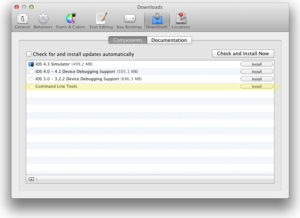
Xcode needs the Command line tools installed.
To do this, open Xcode, click the Xcode menu, and select preferences.
Click install next to Command line tools:
Thanks heaps for this Alex!
Thanks a lot Alex! It saved my day.
I just checked the PATH virbaale on my machine and it includes this entry:/usr/local/AVRMacPack/binI don’t remember adding this explicitly to the path but then I am not sure what I had for breakfast most days.The path was altered when I previously got the AVRMacPack stuff installedThe installer must have done this because it modified /etc/profile to include the following section:if [ -e “/usr/local/AVRMacPack” ]; thenPATH= $PATH:/usr/local/AVRMacPack/bin export PATHfi
Great, thanks