Transparent proxy from node.js app to WordPress for /blog route
app.use('/blog', proxy('blog.domain.com', {
    forwardPath: function(req, res) {
        return require('url').parse(req.url).path;
    }
}));
This now transparently proxies from /blog to the subdomain!
Getting header / footer content from separate resource
I created a separate route for the header & footer of the site, so that these always stay ‘in sync’ with the main site.
This stops the need to update these sections in WordPress – I can simply leave WordPress to manage my blog posts.
To pull in the content, I use the following (footer.php example)
<?php
  $c = curl_init('http://www.domain.com/content/footer');
  curl_setopt($c, CURLOPT_RETURNTRANSFER, true);

  $footerhtml = curl_exec($c);

  if (curl_error($c))
      die(curl_error($c));

  $status = curl_getinfo($c, CURLINFO_HTTP_CODE);

  curl_close($c);
?>

<footer id="footer">
<? echo($footerhtml) ?>
</footer>
This retrieves the content from the provided url, and spits it out in my template.
Redirecting to /blog from .blog subdomain
One thing I am currently stuck on;
If a user visits blog.domain.com – I want them to be redirected to www.getcarclean.com/blog
I’ve got a htaccess set up for this, and I”m almost there.
Please see this StackOverflow question for more details:
http://stackoverflow.com/questions/29866797/redirect-if-request-uri-did-not-come-from-subdirectory-of-main-domain
WordPress Settings
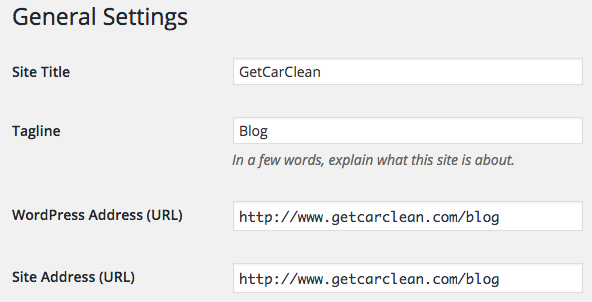
Below, are the settings I used for the WordPress URLs, to ensure URLs are re-written correctly